ZyroSky 3D
Watched 2,769 times
Video description
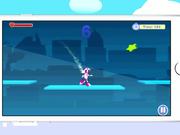
From the makers of the award-winning ZyroMath comes another fun, interactive, game for young children and children with special needs. ZyroSky 3D is an integrated switch-accessible runner-game for children that keeps kids motivated. Test your reflexes as your robot Zyro races through the city, collecting stars and power-ups that give you special powers. Touch to jump and avoid obstacles, and use your points to buy new characters in the ZyroStore. See how far you can run!
Key Features of ZyroSky 3D
1. One-touch input for help in improving hand-eye coordination and fine motor skills for children
2. Graphics and music can be graded to make this game suitable for sensory sensitive kids
3. Beginner, Advanced, and Expert mode to to provide easy-selectable options based on the motor skill level or cognitive skill level of the child
4. Switch-accessible for children with motor limitations who use an external switch (connected through a Bluetooth switch interface such as TabAccess or Zumo)
5. A customizable learning mode than can learn optimal game settings to personalize settings to the needs of the child
6. Customizable settings, such as the ability to remove obstacles or reduce game speed, to increase access for children of all skill levels and abilities
7. Reporting option enables parents, teachers, and clinicians to monitor their child’s progress
8. Includes the ZyroStore where kids can buy characters as a motivational reward for reinforcement and to encourage repeated play
9. Stores information for multiple-users so can keep profiles saved for a group of children
10. This app does not share personal information. There are no in-app purchases or advertisements.
Category:
Top Free Online Videos tagged Commercial
Added on
08 Dec 2016
Comments