Flash Arcade Lanes
102,730 play times
Game controls
Bowl
Fullscreen (page)
Game details
What is Flash Arcade Lanes about?
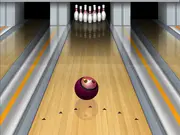
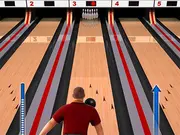
Strive to score a perfect 300 in this traditional bowling simulation. Use the mouse to aim the ball. Once you've selected a spot on the lane to throw the ball from, gently move the mouse back and forth to aim the arrow in the direction that you want the ball to go. Click and hold the mouse to start a second arrow rotating around the ball. Releasing the mouse will bowl the ball down the alley.
Can we play Flash Arcade Lanes on mobile?
No, Flash Arcade Lanes is designed for desktop play and works best on computers using a keyboard or mouse.
Is Flash Arcade Lanes free to play?
Yes, Flash Arcade Lanes is free to play on Y8 and runs directly in your browser.
Can we play Flash Arcade Lanes in full screen mode?
Yes, Flash Arcade Lanes can be played in full screen mode for a more immersive experience.
What games can we try next?
Explore more games in our Bowling games section and discover popular titles like Go bowling 2, Mini Bowling 3D, Strike: Ultimate Bowling 2, and Super Bowling Mania - all available to play instantly on Y8 Games.
Category:
Sports Games
Added on
13 Aug 2014
Comments


-

Drift Battle 2
-
Ace Driver
-
123Go Motorcycle Racing
-
Car Can Racing
-
King of Drift
-
Hershey's Train Line
-
Bowling
-
Fish Bowling
-
Classic Bowling
-
3D Bowling
-
Pro Bowling 3D
-
Death Alley
-
Go bowling 2
-
The Bowling Club
-
Rope Puzzle WebGL
-
Bowling
-
Mini Bowling 3D
-
Bowling Ball
-
Bowling
-
Rescue Cut Rope
-
Last Stand One
-
Bowlerama
-
Rope Bawling
-
Bowling Hero Multiplayer