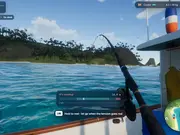
What is Tidewater about?
Wash up on a sunny tropical island with a rod, a little boat and a fish log to fill. Walk the beach and the pier, then head out across a living ocean and try to finish the day's work before dark. Cast, wait for the bite, and play the line. Log each species, sell your catch to Joe, and buy upgrades and diesel from Marta. Landscape, desktop only (keyboard and mouse). Requires WebGPU: please play in an up-to-date Chrome or Edge on a desktop computer. First launch compiles shaders and can take 1-2 minutes.
What kind of game is Tidewater?
The game is a fishing and exploration simulator set on a sunny tropical island. You can explore the beach and pier, sail across the ocean, catch different fish, and fill your fish log.
How do we play Tidewater?
Use your keyboard and mouse to explore the island and control your fishing trips. Cast your line, wait for a bite, and play the line to catch fish. Sell your catch to Joe and buy upgrades and diesel from Marta to keep your fishing adventure going.
What’s the main goal in Tidewater?
Your main goal is to catch different fish, record every species in your fish log, and finish the day's fishing work before dark. You can also sell your catches and use the money to improve your equipment.
Can we unlock new content in Tidewater?
You can purchase upgrades to improve your fishing experience and keep your boat supplied with diesel. The game also encourages you to discover and log different fish species as you explore the living ocean.
Does Tidewater work well with touch controls?
The game is designed for desktop computers and uses keyboard and mouse controls, so touch controls are not supported as the intended way to play. It also requires WebGPU, so you should use an up-to-date version of Chrome or Edge on a desktop computer. The first launch may take one to two minutes while the shaders compile.
Can we play Tidewater on mobile?
No, Tidewater is designed for desktop play and works best on computers using a keyboard or mouse.
Is Tidewater free to play?
Yes, Tidewater is free to play on Y8 and runs directly in your browser.
Can we play Tidewater in full screen mode?
Yes, Tidewater can be played in full screen mode for a more immersive experience.
What games can we try next?